Transform Photos with Vector Acid Color Action
Understanding the Visual Impact
In the crowded world of digital imagery, standing out is no longer optional—it’s essential. The Vector Acid Color Photoshop Action is a specialized tool designed to bridge the gap between standard photography and high-impact graphic design. Unlike standard color grading, this action applies a specific algorithmic treatment that mimics the vibrancy and edge of vector art while maintaining the depth of a raster photograph. It isn't just about saturation; it is about restructuring the color palette of an image to feel electric, modern, and undeniably bold. For photographers and designers, this creates an opportunity to turn a mundane snapshot into a piece of art that commands attention in a social media feed or a design portfolio.
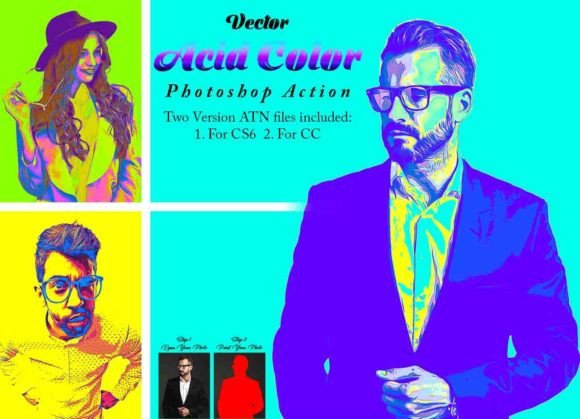
The visual characteristics of the results are distinct. You can expect intensified contrast, often pushing shadows deeper and highlights to a crisp, clean white, while the mid-tones explode with "acidic" hues—think neon greens, electric blues, and piercing magentas. This style leans heavily into a modern, edgy aesthetic. It works exceptionally well for images that need to convey energy, youth, or futurism. While a traditional serif font might suggest history and stability, the visual output of this action acts more like a dynamic display font—it is loud, expressive, and impossible to ignore. It brings a level of professionalism to creative projects that standard Instagram filters simply cannot replicate.
Practical Application and Workflow Integration
One of the biggest hurdles with premium design assets is often the complexity of the installation and usage. The Vector Acid Color Photoshop Action addresses this by providing a streamlined workflow, though it requires specific preparation to achieve the best results. The creators have tested this extensively on Photoshop CC2022 English Version, ensuring compatibility across a wide range of software from CS6 to the latest Creative Cloud iterations. This stability is crucial for commercial work where time is money and technical glitches are not an option.
To achieve the intended effect, the action relies on a specific canvas setup. It requires users to resize their images to a standard dimension of 3000px by 2000px at 72 resolution before execution. This standardization ensures that the pixel manipulation is consistent, preventing the "glitchy" look that can occur when running complex actions on low-resolution files. The process involves creating a specific layer named "paint" where you brush over the areas you want to affect. This selective application is what elevates the tool from a simple filter to a strategic design asset. It allows for a visual hierarchy where the subject pops against a more subdued or stylized background, a technique frequently used in high-end editorial design and packaging design.
Furthermore, the inclusion of 10 distinct color options within the ATN files provides versatility. You aren't locked into a single "acid" look. Whether you are working on a moody, cyberpunk-inspired web design hero image or a vibrant social media graphics campaign, you can test different color profiles to match the specific brand identity you are building. The availability of a video tutorial and PDF help file also demonstrates a commitment to user experience, ensuring that even those new to Photoshop actions can integrate this into their toolkit effectively.
Strategic Use in Branding and Marketing
For entrepreneurs and marketers, the value of a tool like the Vector Acid Color Photoshop Action lies in its ability to shape brand perception. Visual consistency is the backbone of a strong brand identity. By using this action to stylize product photography or lifestyle images, you create a cohesive visual language that audiences begin to recognize instantly. In a marketplace saturated with clean, minimal aesthetics, the "acid" look offers a way to break through the noise. It suggests that a brand is innovative, daring, and in tune with contemporary design trends.
Consider its application in logo design presentations. If you are designing a logo for a tech startup or a music festival, presenting the mockup with this specific color treatment can significantly enhance the pitch. It transforms a flat logo concept into an experience. Similarly, for content creators and bloggers, using this style for featured images can increase click-through rates. The human eye is naturally drawn to high contrast and unusual color combinations. When used thoughtfully, it can guide the viewer's eye exactly where you want it, improving readability of overlaid text and overall engagement.
However, practical guidance is necessary for choosing when to use this tool. It is a creative font equivalent in image form—highly stylized. It works best for projects targeting younger demographics, the entertainment industry, fitness, or technology sectors. It might be less appropriate for conservative corporate communications or traditional luxury brands that rely on subtle, earthy tones. The key is evaluating the project fit. Always test the action on a sample image first. Does the resulting "personality" of the image match the message you are trying to convey? If the goal is to look "awesome" and "unique," as the tool promises, it delivers. If the goal is quiet elegance, you may need to dial back the opacity or choose a more muted color option from the ten provided.
Technical Considerations for Commercial Use
When integrating any premium font or action into a commercial pipeline, technical reliability is paramount. The Vector Acid Color Photoshop Action includes a specific instruction regarding the "paint" layer. Users must remember to close the "paint" layer eye but keep the layer selected before playing the action. This specific step is a common point of failure in complex Photoshop scripts. Skipping it can result in errors or a flattened, non-editable result. Adhering to the provided workflow ensures that the layers remain intact, allowing for non-destructive editing—a standard requirement for professional graphic design.
From a file management perspective, having two versions of the ATN files (CS6 and CC) is a thoughtful inclusion. It ensures that teams working across different machines or legacy software versions can maintain consistency. This is particularly important for agencies where one designer might be on an older machine while another is on the latest update. The use of the Oil Filter within the action adds a textural quality that mimics traditional art styles, adding a layer of sophistication that purely digital effects often lack.
Ultimately, the Vector Acid Color Photoshop Action is more than just a color changer; it is a stylistic amplifier. It takes the raw material of a photograph and applies a layer of modern typography energy to it. For the small business owner looking to elevate their DIY marketing materials, or the seasoned designer looking to speed up their workflow, it offers a tangible return on investment. It allows you to produce high-quality, commercial font